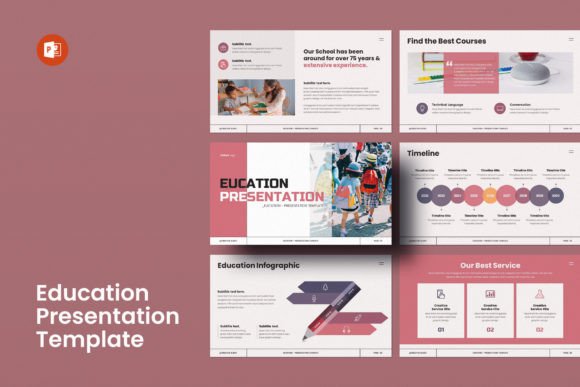
Elevate Your School's Presentations with This Template
Presenting an educational institution, whether it's a bustling elementary school, a dedicated nursery, or a forward-thinking university, requires more than just listing facts and figures. You need to convey a feeling—a sense of community, quality, and potential. This is where the right visual tools become essential. The Education PowerPoint Presentation Template is designed specifically for this purpose, acting as a foundational design asset for administrators, marketers, and educators who need to communicate their institution's value with clarity and professionalism.
More Than Just Slides: A Visual Identity Toolkit
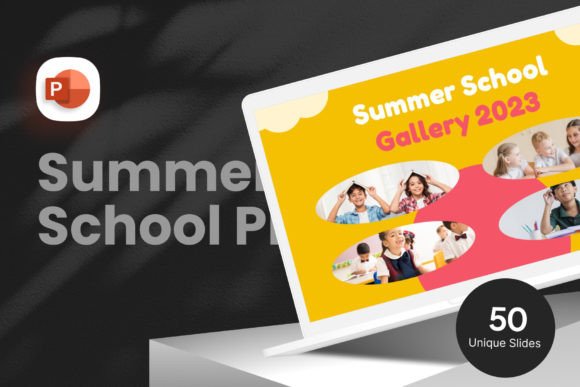
At its core, this is a comprehensive PowerPoint template, but thinking of it merely as a set of slides undersells its utility. It functions as a flexible brand identity system for your school's presentations. The visual personality is clean, modern, and approachable. It avoids overly childish aesthetics, making it suitable for all levels of education, from daycare centers to professional training institutes. The style balances structured information layouts with engaging visual elements, ensuring your message is both credible and captivating.
The appeal lies in its adaptability. With 20+ color themes included, you can instantly align the template with your school's official colors. This consistency is crucial for building recognition and reinforcing your brand every time you present. The 35 pre-designed slides cover a wide range of needs: from introducing your campus and faculty to showcasing student achievements, outlining curricula, and presenting financial data. Each slide is a canvas built on a 16:9 Full HD ratio (1920x1080px), ensuring your presentations look sharp and professional on any modern screen or projector.
Practical Applications for Real-World Projects
Where does an Education PowerPoint Template like this truly shine? Its value extends far beyond the annual parent-teacher night. Consider these practical scenarios:
- Open Houses & Recruitment Events: A cohesive, well-designed presentation immediately sets a positive tone. It demonstrates attention to detail and pride in your institution, influencing first impressions of prospective families.
- Board Meetings & Funding Proposals: Presenting data on student performance, budget allocations, or new program initiatives requires a clear visual hierarchy. The template's structured layouts help you guide stakeholders through complex information without overwhelming them.
- Teacher Training & Workshops: Use the slides to deliver professional development content. The consistent design helps maintain focus on the material, improving readability and information retention.
- Student Orientation: Welcome new students and their families with a polished overview of school life, policies, and resources. It sets a standard of professionalism from day one.
For marketers and content creators working with educational clients, this template is a time-saving design asset. Instead of building presentations from scratch, you have a robust, editable framework. The 4000+ icons pack is particularly valuable, allowing you to visually represent concepts—from science beakers to sports equipment—without sourcing external graphics. The easy drag & drop to change picture feature means you can seamlessly integrate your school's own photography, making every presentation uniquely yours.
Key Features That Empower Your Work
The template's design choices directly impact its usability and effectiveness. Every graphic element is 100% resizable and editable. This means you can adjust a chart, modify an icon's color, or resize an image placeholder without breaking the slide's layout. This level of control is essential for maintaining a polished final product. The use of free fonts (with links provided in the Help File) is a thoughtful touch, eliminating unexpected licensing costs and ensuring you can immediately edit text without hassle.
Cross-platform compatibility (iMac & Windows) ensures that your entire team can collaborate seamlessly. The 16:9 aspect ratio is now the standard for most display environments, eliminating those awkward black bars on widescreen monitors and projectors. Furthermore, the promise of free & fast support service from the designers adds a layer of security. If you encounter a technical hurdle or have a question about customization, you have direct access to expert help.
Making the Most of This Educational Design Asset
To leverage the Education PowerPoint Template effectively, consider these practical tips:
- Start with Your Brand: Before diving into content, select the color theme that matches your institution's brand guidelines. This one step ensures immediate consistency across all your materials.
- Curate Your Imagery: Since images are not included, plan to use high-quality photos of your actual campus, students, and staff. Authentic photography paired with this premium template design will create a powerful and trustworthy narrative.
- Customize for Your Audience: A presentation for kindergartners' parents will have a different tone than one for university donors. Use the template's flexibility to adjust the language, iconography, and data emphasis accordingly.
- Pair It Wisely: While the template has a defined style, you can enhance it with complementary font pairing. The included free font is likely a clean sans serif font for body text. Consider using a bold display font or a classic serif font for major headings to add visual interest and improve the typeface hierarchy.
In a digital landscape saturated with generic templates, the Education PowerPoint Presentation Template stands out by offering a thoughtful blend of aesthetic appeal and practical functionality. It’s not about flashy effects; it’s about providing a reliable, professional-grade tool that helps educational institutions tell their story effectively. For designers, entrepreneurs, and small business owners in the education sector, it’s an investment that streamlines workflow and elevates the perceived quality of every communication.