Education Google Slides Template: Visual Storytelling for Modern Institutions
Presenting an educational establishment, whether it's a bustling nursery, a forward-thinking high school, or a specialized training academy, requires more than just listing facts and figures. It's about conveying a feeling—the energy of the campus, the quality of the curriculum, and the promise of potential. The Education Google Slides Template is built precisely for this task, acting as a dynamic visual framework to showcase your institution's unique story and strengths. It moves beyond basic bullet points, offering a polished, professional canvas designed to resonate with parents, students, and stakeholders alike.
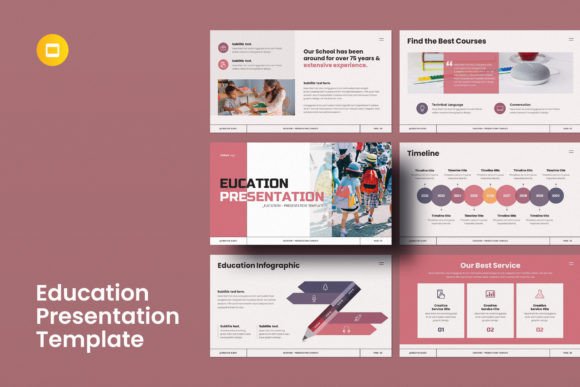
This isn't just a collection of pre-made slides. Think of it as a comprehensive design system for your educational branding. The template provides a cohesive visual language through its 35 meticulously crafted slides, allowing you to present everything from campus facilities and faculty profiles to curriculum outlines and extracurricular activities with consistent style. Its personality is one of clarity, approachability, and modern professionalism. The design balances clean, contemporary layouts with engaging visual elements, ensuring your content is both informative and visually compelling. It’s the kind of tool that helps transform a standard presentation into a memorable brand experience.
Where This Template Truly Shines: Beyond the Classroom
While its name points to education, the versatility of this Google Slides template extends to any project requiring a clear, structured, and visually engaging narrative. Consider its application for a startup pitching to investors, a marketing agency outlining a new campaign strategy, or a non-profit presenting its annual impact report. The underlying design principles—strong visual hierarchy, ample white space, and a balanced mix of imagery and text—are fundamental to effective communication across industries. The template’s 16:9 Full HD ratio and resizable graphics make it equally at home on a conference room screen, a laptop during a virtual meeting, or embedded on a website.
The real power lies in its adaptability as a core design asset. With over 20 color themes included, you can instantly align the presentation with your organization’s brand identity. This is crucial for maintaining consistency across all touchpoints. The extensive 4000+ icon pack is another practical boon, offering a vast library of symbols to visually represent complex ideas, processes, or features without relying on generic stock photos. For a content creator or blogger, this could mean developing a polished media kit. For a small business owner, it’s a streamlined way to create client proposals or internal training materials that look professionally designed without the associated cost or timeline.
Practical Guidance for Integration and Impact
Adopting a new template is about more than just dropping in your logo. To leverage the Education Google Slides Template effectively, start by evaluating its font pairing and overall style against your project's tone. The included free fonts are selected for their readability and modern appeal, but the template’s 100% editable nature means you can swap them to better match your existing brand typography if needed. Test how your core messages look on a few key slides—like a title slide, a data-heavy slide, and a team introduction slide. Does the visual hierarchy guide the eye naturally? Does the sans serif font choice support your content’s voice, whether it’s innovative, trustworthy, or friendly?
Remember, the images you choose will dramatically influence the final feel. The template’s easy drag-and-drop picture placeholders are designed to work seamlessly with your own high-quality photos. This is where you inject authenticity. Instead of generic classroom shots, use images that capture the genuine spirit of your community or the tangible results of your work. The template provides the professional structure; your content provides the unique story. For commercial projects, always verify the licensing of any additional assets you incorporate, like specific icons or images, though the template’s core components are licensed for broad use. The goal is to create a presentation that not only informs but also builds recognition and engagement, turning viewers into advocates for your brand or institution.